Infradapt VoiceHelpOpen Infradapt Voice

Pick up a parked call

A colleague parked a caller for you. Here's how to take the call from wherever you are.

Takes about 1 minute
Pick it up
  1. Go to Phone in the left column

    A number on Phone tells you how many callers are parked.

  2. Find the caller under Parked calls

    Each one shows the spot number, who's calling, and how long they've waited.
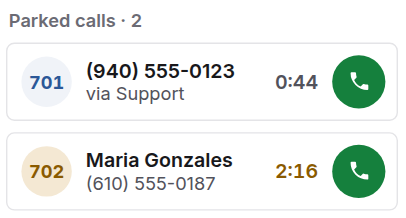
  3. Click the green phone button next to them

    The Parked calls list with two callers waiting, in spots 701 and 702.
  1. Open the People tab

  2. Look under Parked at the top

    Each caller shows their spot, for example Slot 701, and how long they've waited.

  3. Tap the caller

    You're connected straight away.

From a desk phone

Dial the spot number, for example 701.

Good to know
Waiting a while?The time turns orange once someone has waited a minute. After 5 minutes, everyone using the computer app gets a reminder too.
Related guides
Up to date with Computer app 1.0.109 and Phone app 1.20